
In what's inside a vector, we built a little spreadsheet of animals — each described by the same columns (weight, legs, furriness, domesticated, flies), each row a vector. We saw that similar animals end up with similar rows. Nice picture. But a picture of storage isn't the point. The point is searching, and this is where the whole idea finally clicks.
Because searching that spreadsheet turns out to be almost embarrassingly simple: your search is just another row.
Turn your question into a row
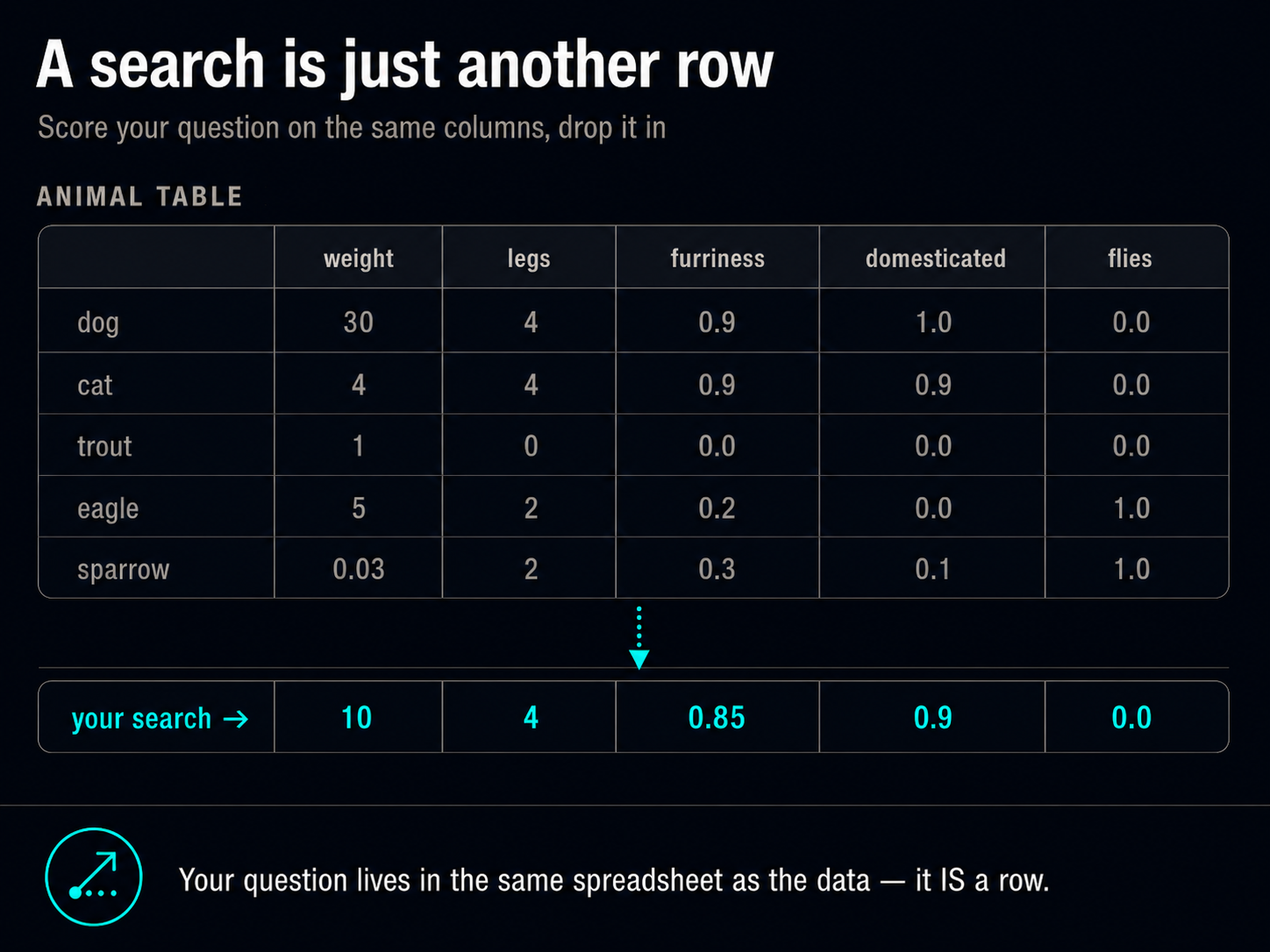
Say you're picturing an animal and you want the database to find it: a medium-size, four-legged, furry, friendly pet that doesn't fly. You can't hand the computer that sentence. But you can do exactly what you did for every other animal — score it on the same columns:
- weight: medium — call it 10 kg (heavier than a cat, lighter than a dog)
- legs: 4
- furriness: high (≈ 0.85)
- domesticated: high (≈ 0.9)
- flies: no (0)
And there it is — a row: [10, 4, 0.85, 0.9, 0]. That's your query. It looks exactly like the rows already in the table — all numbers, same columns — because it was built the same way. Every word you had in mind ("medium," "furry," "friendly") became a number in the same slot the animals use.
This is the whole secret, and it's worth saying slowly: your question lives in the same spreadsheet as the data. It's not a different kind of thing that has to be matched against the rows — it is a row. Searching is just figuring out which existing rows sit closest to the new one you added.
Find the nearest rows — by hand
So let's find them. Drop your query row in and compare it, column by column, to each animal already in the table. For each column, ask "how far apart are these two values?" — then combine those into a single sense of "how far apart overall."
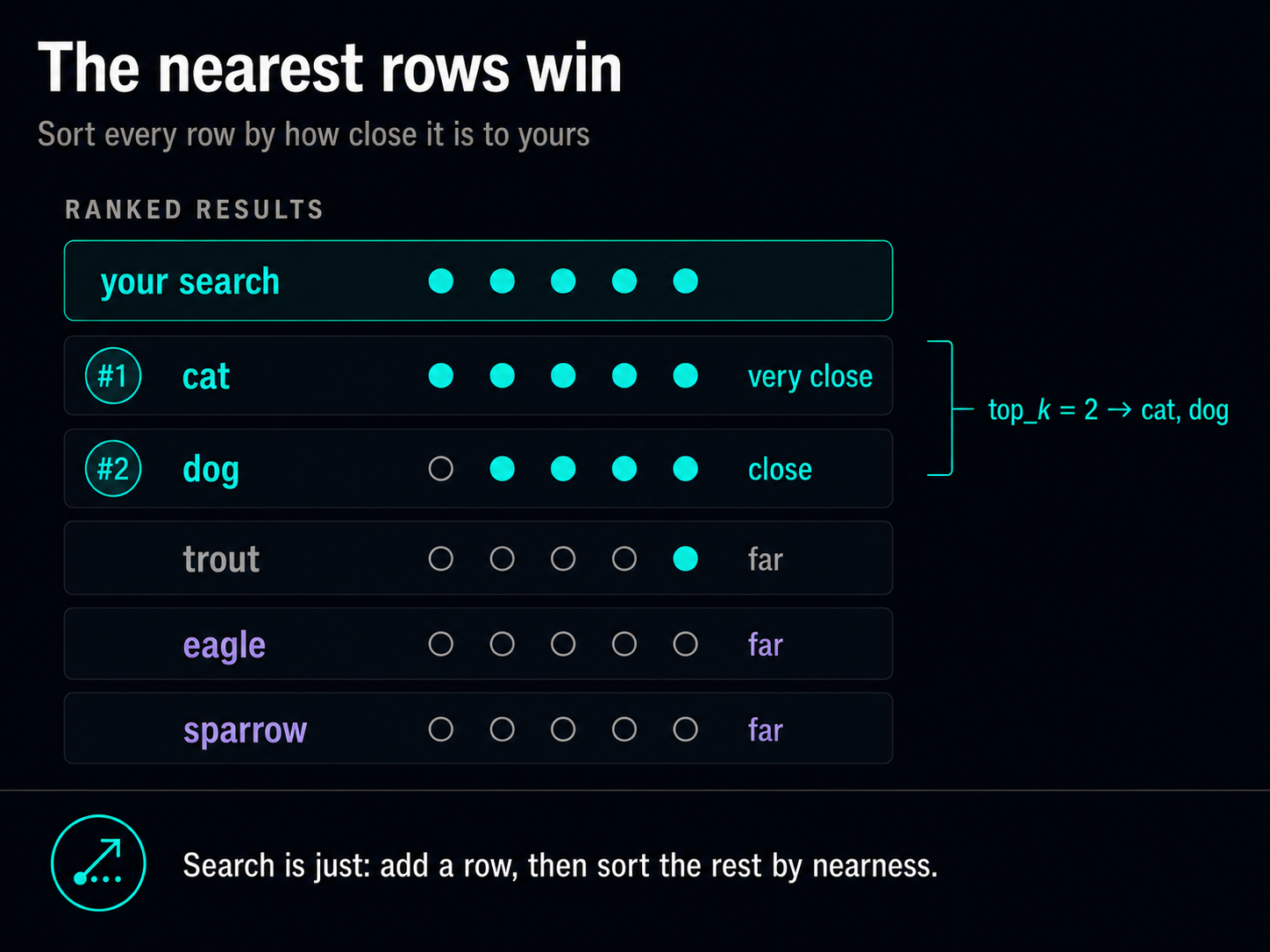
- cat → same number of legs, nearly identical furriness, both friendly pets, neither flies, and the weight's in the same ballpark. Almost every column agrees. Very close.
- dog → legs, furriness, pet-ness, and flying all line up; only the weight is off (your 10 kg against a 30 kg dog). Agrees on most columns. Close.
- trout → wrong on legs, wrong on furriness, wrong on pet-ness. Agrees on almost nothing. Far.
- eagle and sparrow → two legs not four, barely furry, not pets, and they fly. Nearly every column disagrees. Far.
Line them up and the answer is obvious: cat is the closest row, then dog, and the birds and the fish are far away. You just ran a vector search with your eyes. No algorithm, no math you couldn't do in your head — just "which rows are nearest to the one I added?"
That "how far apart overall" number is the only real machinery, and even it is simple: a single number summarizing the column-by-column differences. (There's more than one sensible way to compute it — that's the subject of cosine similarity vs Euclidean distance — but they're all answering the same question: how close are these two rows?)
This is what the search knobs actually mean
Once you see search as "add a row, sort the rest by nearness," the options a vector database gives you stop being jargon:
- The "score" on each result is just how close that row landed to your query row. Nearer row, higher score. It's a distance turned into a "goodness of match."
- top_k = 3 means "give me the 3 nearest rows." In our table, top_k = 2 hands back cat and dog.
- A minimum score is you saying "don't bother returning anything that isn't at least this close." It's a cutoff on the distance — a way to get back nothing rather than a bad match.
None of these are special features bolted on. They're the natural things to ask once results are just rows sorted by distance.
Why the query has to speak the same language
Here's a consequence that trips people up until they picture the spreadsheet — and then it's obvious. Your query row only makes sense if it uses the same columns, in the same order, as the data. Score your query on a different set of columns and the distances are meaningless: you'd be measuring "how far is furriness from weight," which is nonsense.
With hand-built columns you'd never make that mistake. But with real embeddings the columns are invented by a model, so "same columns" means "same model." Use one model for your data and a different one for your query and you get exactly this failure — rows that come back looking random. That's the number-one cause of weird results, and now you can see why: two different sets of columns aren't the same spreadsheet, so "nearest row" means nothing across them.
The same thing, just bigger
Everything above you did with five columns you chose and five rows you could eyeball. A real vector database changes only two things, and neither changes the idea:
- Hundreds of columns instead of five — invented by a model rather than named by you, and not individually readable. Your query still becomes a row with those same hundreds of columns.
- Millions or billions of rows instead of five — far too many to compare against one at a time, so the database uses a shortcut to avoid checking every row (why search stays fast). But it's still finding the nearest rows to the one you added.
Query becomes a row; nearest rows win. That operation is identical whether the spreadsheet has five rows or five billion.
Closing
The spreadsheet was never just a way to picture a vector — it's the actual machine. A vector database is a spreadsheet you search by writing one more row and looking at its neighbors. Your question and the stored data are the same kind of thing, described the same way, sitting in the same space, so "search" collapses into "sort by nearness."
That's the whole idea, and you can do it by hand. Everything else — the models, the billions of rows, the millisecond latencies — is that one move, scaled up.